
iHAZOP™
AI HAZOP™ software – from one P&ID to a walkable plant
The first HAZOP workspace that reads your P&ID line by line, paints the HAZOP nodes, drafts every worksheet – and builds the plant in 3D before your team walks into the room.
We didn't automate the HAZOP. We automated the preparation. The argument – and the judgement – stay with your team.
P&ID→NODES→WORKSHEETS→3D PLANT
93%+ accuracy with the full study package
Sector-agnostic
Human-approved at every stage
Aligned with IEC 61882
INSIDE iHAZOP™
Six screens. One study.
01 · OPEN
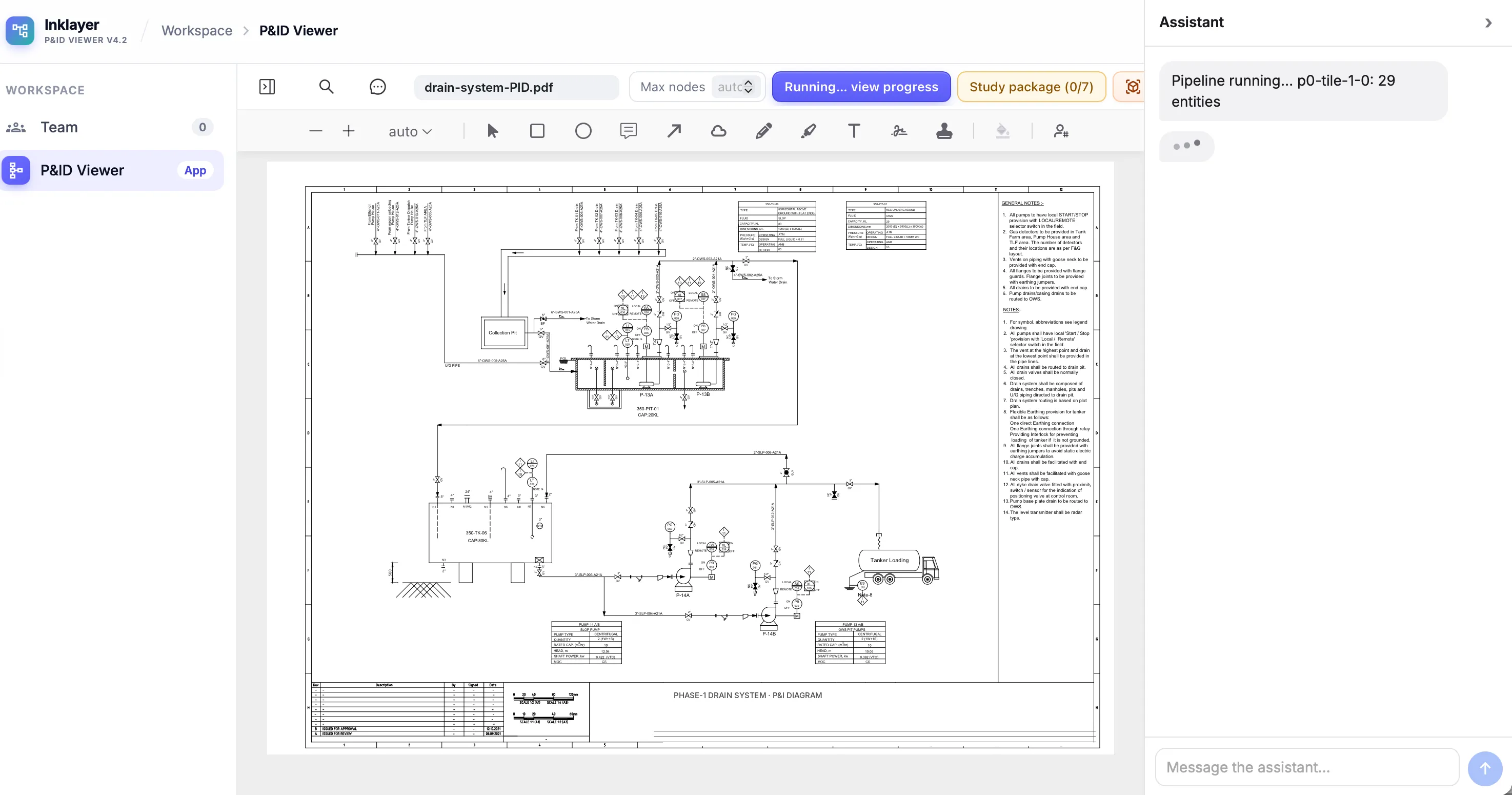
Drop in the P&ID
Any PDF drawing, one sheet or many. Press run.
02 · READ
Watch it read
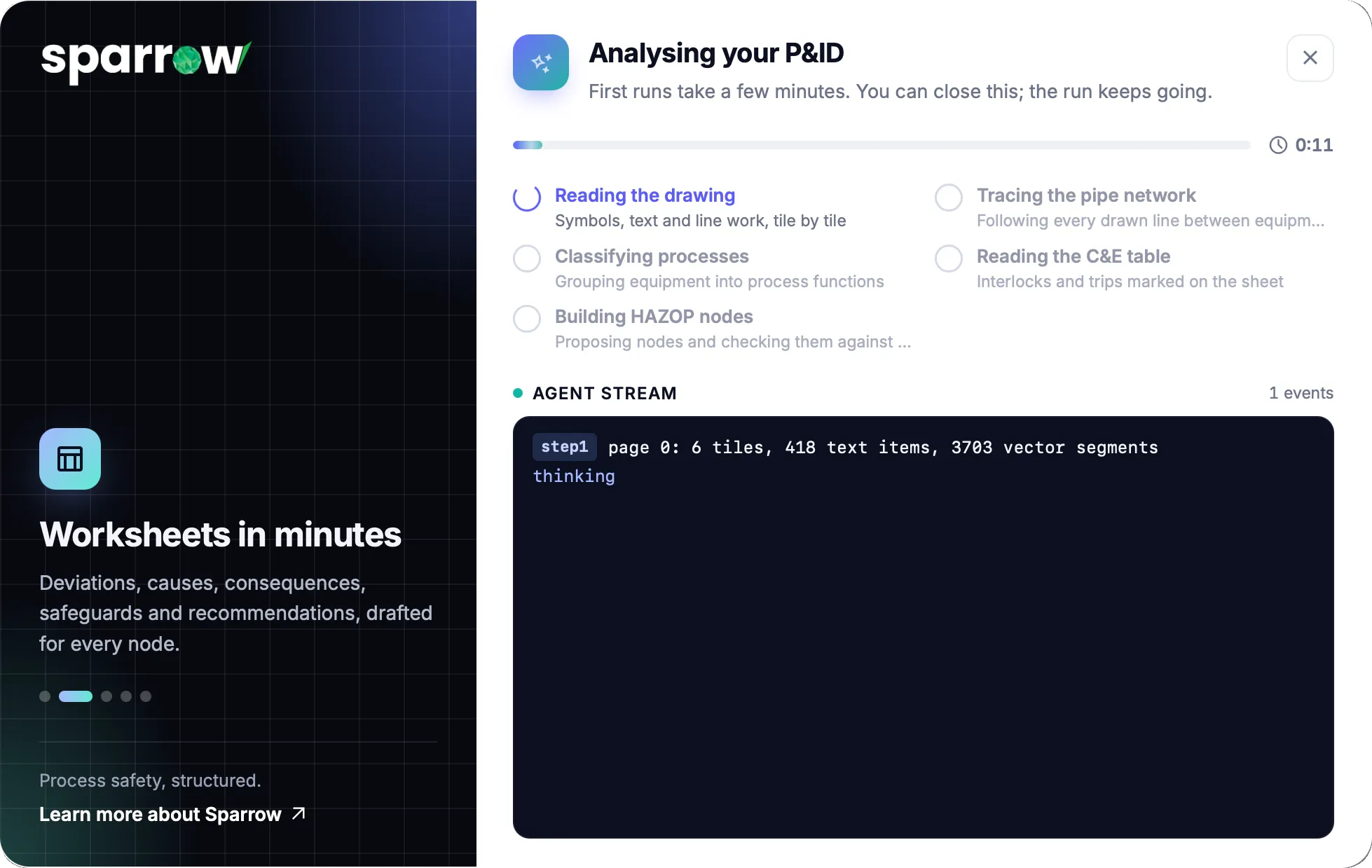
A live agent stream: tiles, text and line work as they are read.
03 · NODE
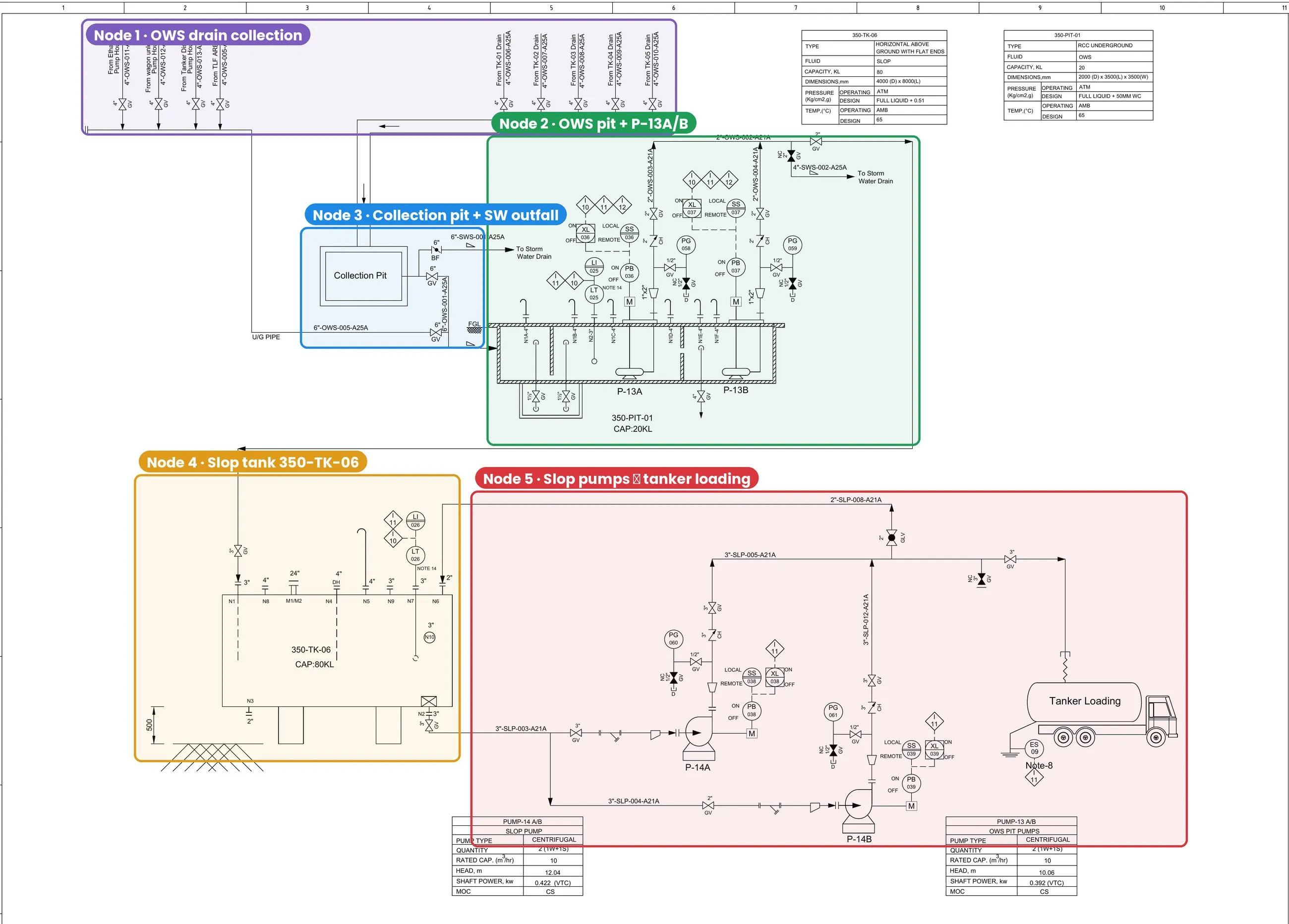
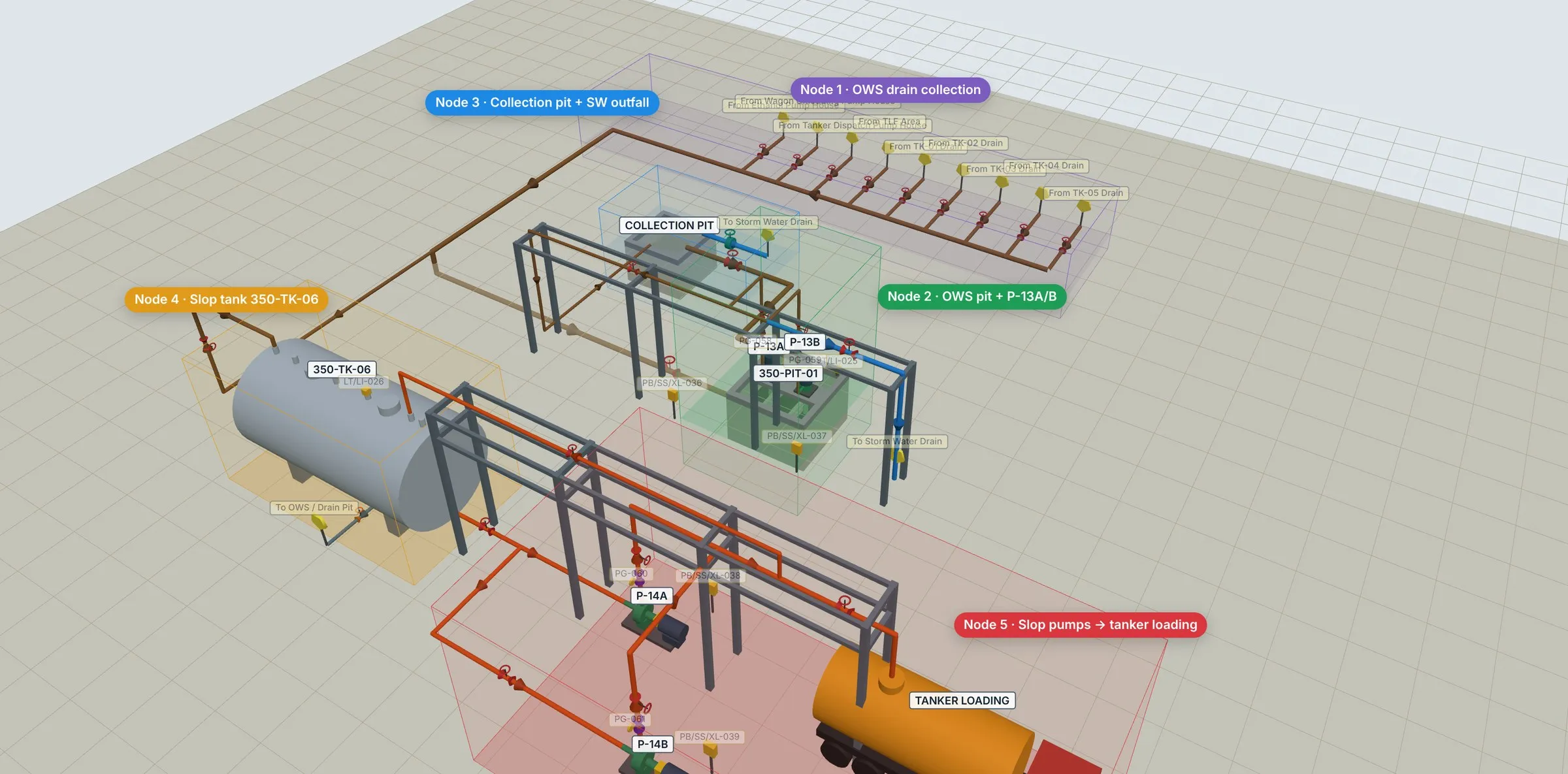
Nodes on the drawing
Whole pipe runs painted as HAZOP nodes, ready to approve.
04 · DRAFT
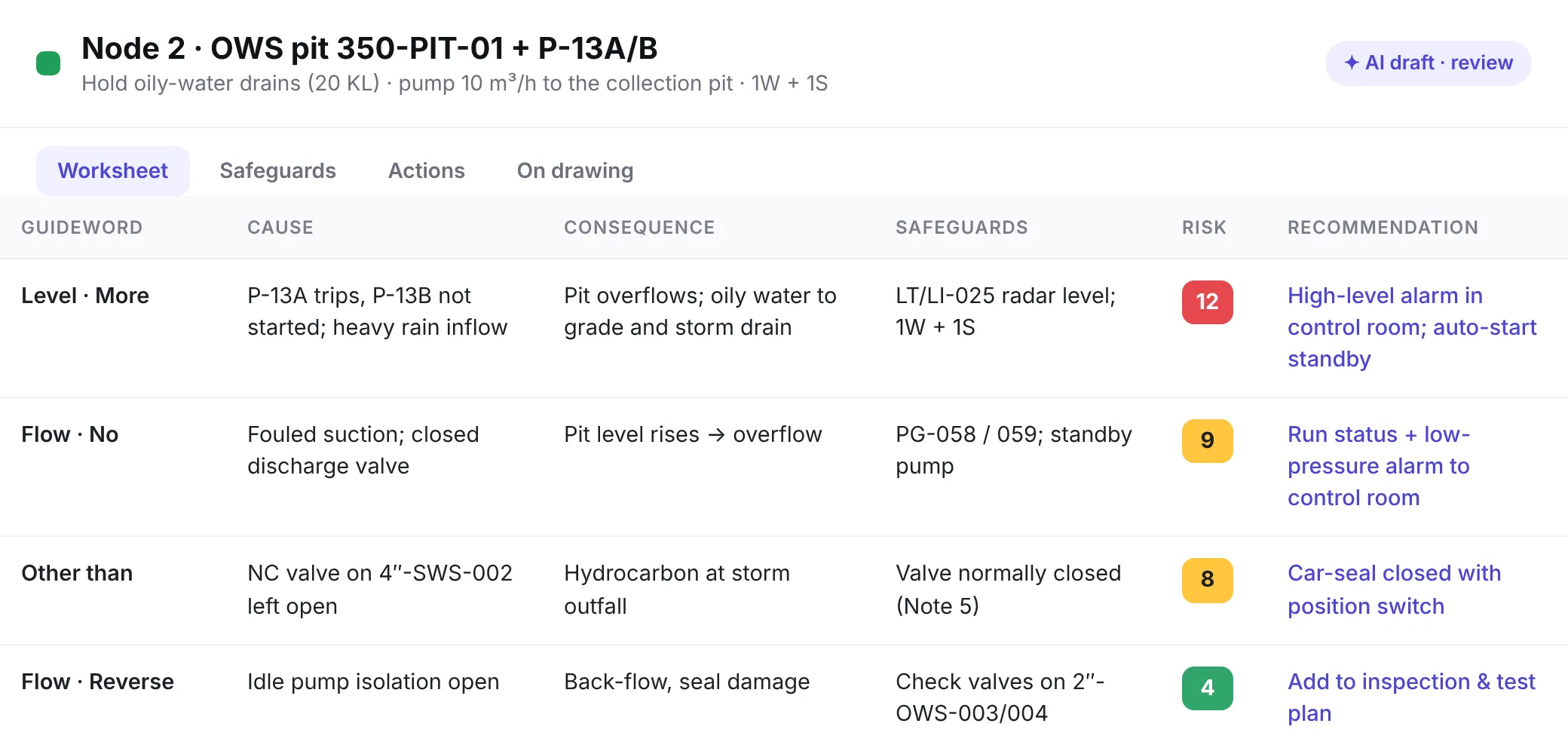
Worksheets, drafted
Deviations, causes, consequences, safeguards – for review.
05 · BUILD
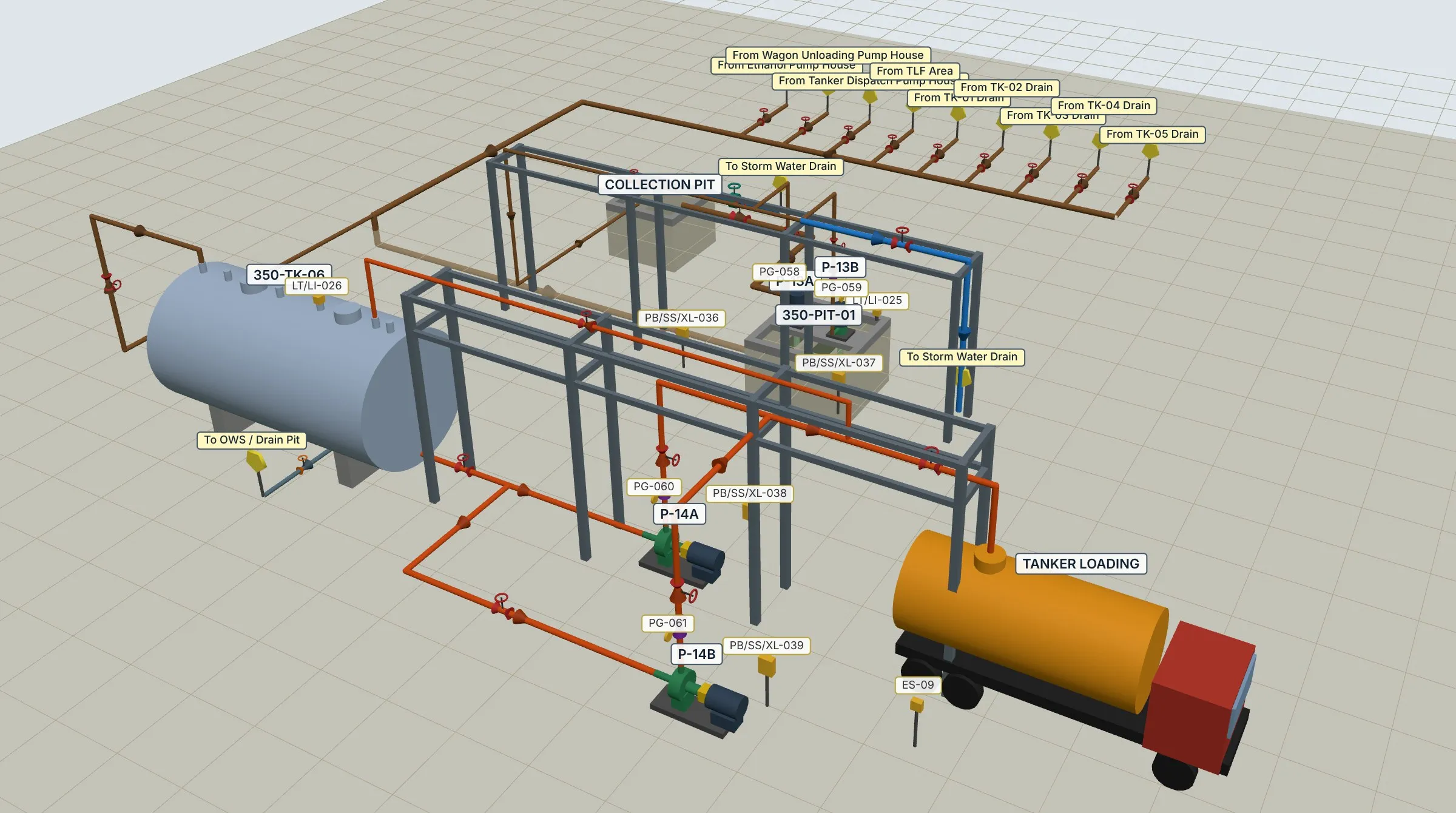
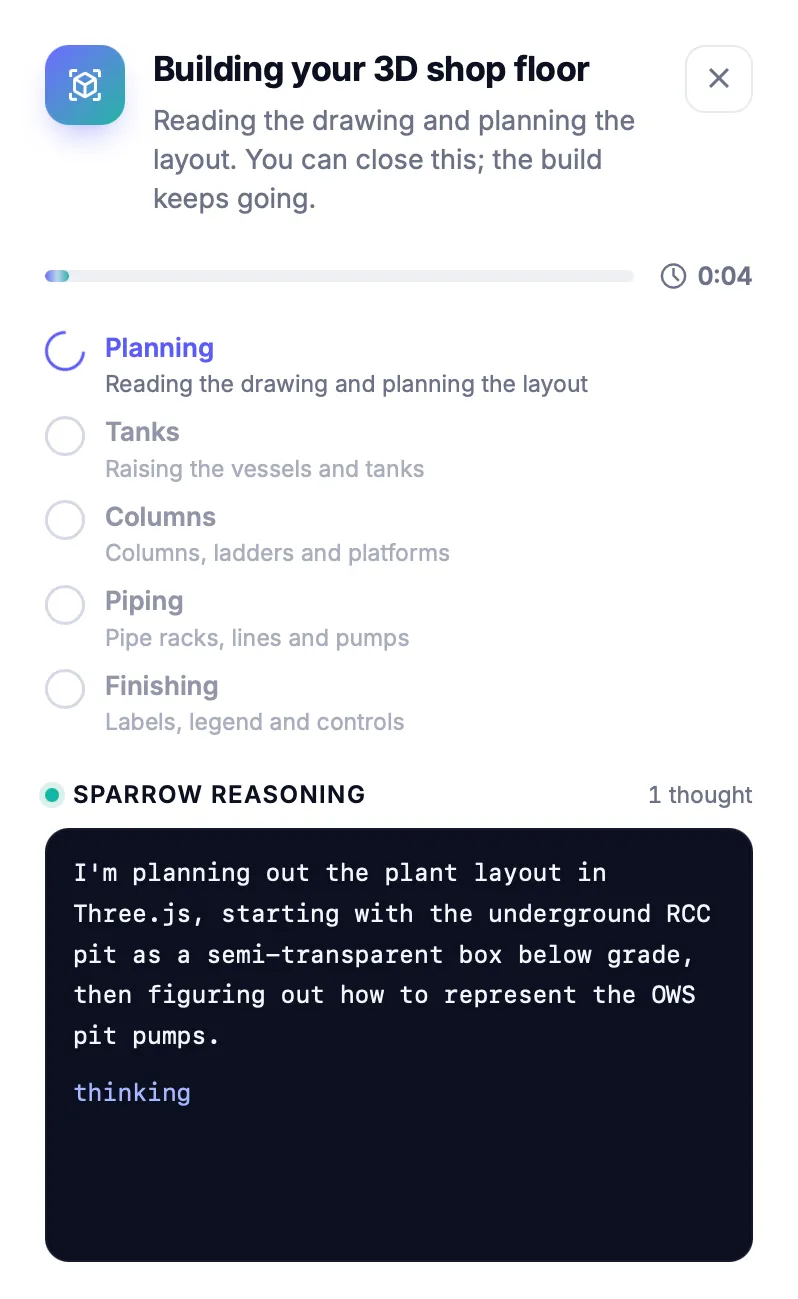
Sparrow reasons in 3D
The model is planned from the drawing, step by step.
06 · WALK
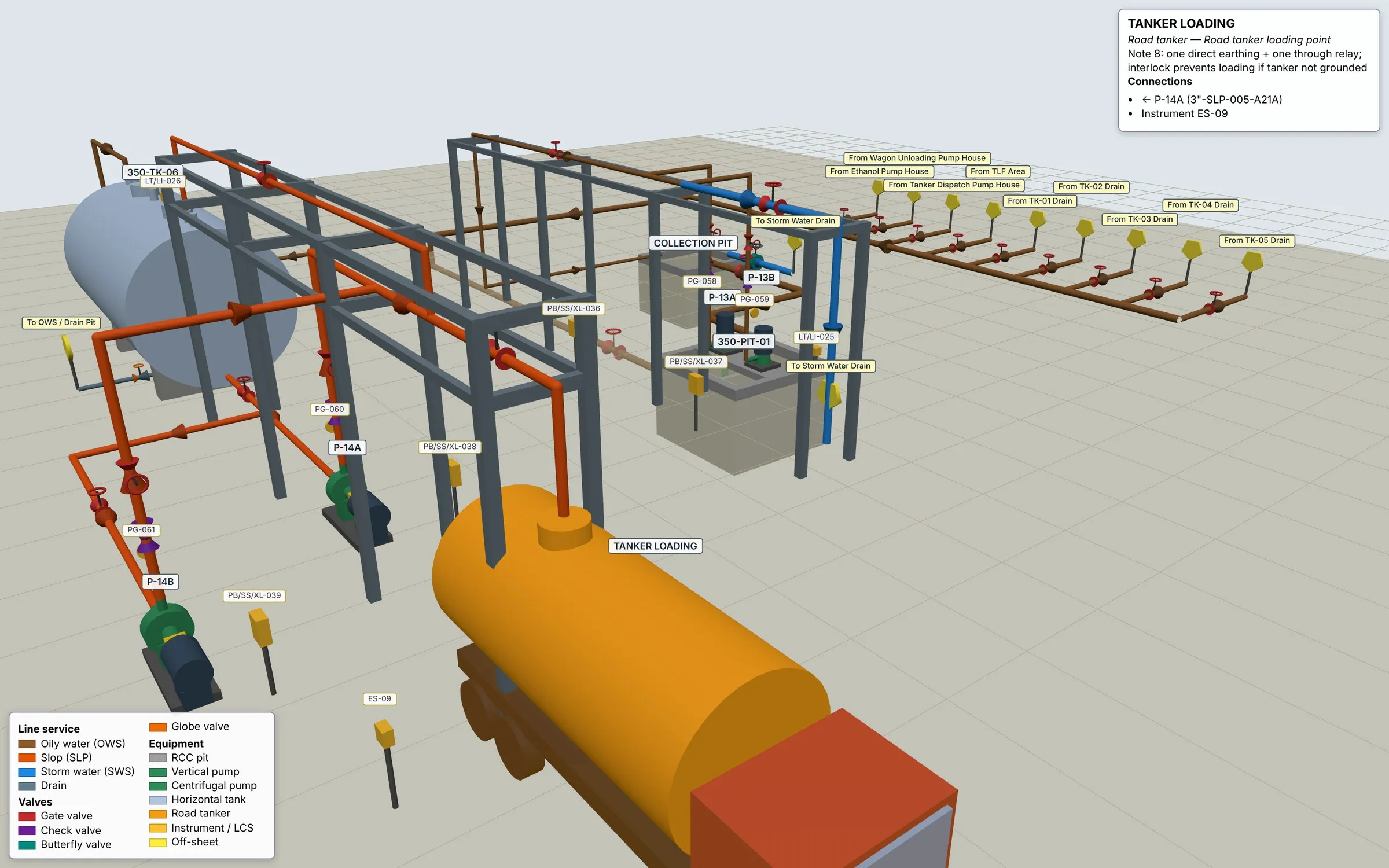
Walk the plant
Click any tag; every node in colour.
01 · WHY NOW
HAZOP is a team sport. The prep isn't.
The value of a HAZOP lives in what the team argues about. Yet most of the effort goes into getting ready to argue.
01
Marked by hand.
Engineers highlight pipe runs on printed drawings, sheet after sheet, before the first node is discussed.
02
Blank worksheets.
Every deviation, cause and safeguard is typed from scratch, node after node, study after study.
03
A plant nobody can see.
Teams reason about layout and interfaces from 2D symbols alone, and miss what sits next to the node.
02 · THE TURN
Drop the drawing.
Most HAZOP software starts with an empty template. iHAZOP™ starts with your drawing. No tag lists. No data entry. One PDF P&ID is the whole brief – iHAZOP™ does the reading, tracing and drafting, and hands your team a study that is ready to challenge.
03 · THE SCIENCE
Four steps. One drawing.
Numbers below are from a real run on a single-sheet drain-system P&ID of a POL storage terminal.
01 · READ
Reads every line
Symbols, text and line work, tile by tile.
418 text items
3,703 vector segments
3,703 vector segments
02 · TRACE
Traces the network
Follows every drawn line between equipment and groups it into process functions.
147 entities
→ 24 processes
→ 24 processes
03 · NODE & DRAFT
Paints nodes, drafts worksheets
Whole pipe runs become nodes; guideword deviations, causes, consequences and safeguards are drafted for review.
Draft · awaiting team review
04 · BUILD · NEW
Builds the plant in 3D
Tanks, pits, pumps, racks, valves and instruments – every node in colour, every tag clickable.
≈ 7 minutes, PDF → 3D
04 · THE ACCURACY
Accuracy is engineered in. Layer by layer.
93%+
accuracy when the full study package is provided – P&ID, PFD, cause & effect, process description and data sheets.*
A language model alone guesses. iHAZOP™ does not let it. Every proposal passes through five layers before a person ever sees it.
L1 + L2, LIVE
You see exactly what it read – before you trust it.
On a real drain-system sheet: 6 tiles, 418 text items, 3,703 vector segments, 147 entities classified into 24 processes.
* Internal benchmark. Accuracy depends on drawing quality and the completeness of the documents provided.
05 · THE WORKSHEET
Every row built the way a HAZOP chair would build it.
iHAZOP™ walks the classic HAZOP sequence for every node – and shows its working, so the team can challenge any cell.
01
Node
Boundary on the drawing
02
Design intent
What it must do, at what conditions
03
Parameter × guideword
Flow, level, pressure… × No, More, Less, Reverse…
04
Causes
Credible, from the equipment drawn
05
Consequences
Followed to the worst credible outcome
06
Safeguards
Only what exists on the P&ID
07
Risk ranking
Severity × likelihood on your matrix
08
Recommendations
Owners, actions, closure
FROM THE DRAWING…
Node 2, painted on the P&ID.
The OWS pit, its two pumps and the discharge header – one node, one design intent. Below, the worksheet the team reviews.
↓
Safeguards you actually have
A safeguard is only credited when its tag is on the drawing – no phantom alarms, no assumed trips.
Your risk matrix
Severity and likelihood are ranked on your company's matrix, so results drop straight into your PSM system.
Ready for what comes next
High-risk scenarios and recommendations carry forward into LOPA, SIL and action tracking.
06 · THE PART WE CARE ABOUT MOST
AI proposes. A named engineer decides. At every stage.
HAZOP is a core science-based method. We will not let an AI agent run it. Every stage is integrated – and every stage stops for human approval. Anyone on the team can edit anything, at any point.
STAGE 1 · AI
Read & trace
Drawing read, network traced, equipment classified.
✓ Engineer verifies the read
STAGE 2 · AI
Propose nodes
Nodes painted on the drawing with design intent.
✓ Chair approves, merges, splits
STAGE 3 · AI
Draft worksheets
Deviations, causes, consequences, safeguards.
✓ Team accepts, edits, strikes
STAGE 4 · TEAM
Rank & recommend
Risk ranked, recommendations agreed, owners named.
✓ Chair signs off
STAGE 5 · TEAM
Close actions
Recommendations tracked to closure and revalidation.
✓ Closure verified
AI ROLE 01
Knowledge equivalence
Global knowledge in every room – what similar systems have failed on, what codes and incident history say – so a team's experience is never the ceiling.
AI ROLE 02
Speed, with accuracy
Tracing lines, proposing nodes and pre-filling drafts – the clerical drag removed, so experts spend their time challenging the design.
THE GUARDRAIL
Software proposes. People decide. The record shows which.
Every entry carries who proposed it, who changed it and who approved it.
07 · ANY PLANT
Sector-agnostic. Because the method is.
Guidewords don't care what flows through the pipe – but consequences do. iHAZOP™ brings sector context from Sparrow's practice to every study.
Chemicals & specialty chemicals
Pharma & API
Oil & gas · POL terminals
Fertilisers & agrochemicals
Paints & coatings
FMCG & food
Metals & heavy engineering
Power, renewables & BESS
Utilities & data centres
1,000+
projects delivered
600+
industrial clients
16
countries
125+
domain specialists
08 · THE PROOF
One P&ID in. A walkable plant out.
≈ 7 MIN
→
15 SECONDS
The whole story, start to finish.
From the drawing to the plant in 3D – the way your team will see it.
09 · STANDARDS & COMPLIANCE
Built on the method. Aligned with the rules.
iHAZOP™ follows the HAZOP method as global standards define it, and produces records that support the process-safety regulations your plant answers to.
IEC 61882:2016
Hazard and operability studies – application guide. The HAZOP method itself.
CCPS Guidelines
Guidelines for Hazard Evaluation Procedures – CCPS / AIChE.
IEC 31010:2019
Risk assessment techniques – HAZOP within the wider risk toolkit.
ISO 31000:2018
Risk management principles and guidelines.
IEC 61511
Functional safety – HAZOP output that feeds LOPA and SIL determination.
OSHA 29 CFR 1910.119
Process Safety Management – process hazard analysis (e), documented resolution and revalidation.
EPA 40 CFR Part 68
Risk Management Program – process hazard analysis for covered processes.
Seveso III · COMAH 2015
EU Directive 2012/18/EU and UK COMAH – hazard identification for major-accident sites.
IS 15656:2006
Hazard identification and risk analysis – Indian code of practice.
MSIHC Rules, 1989 · Factories Act, 1948
Indian major-accident hazard rules and hazardous-process provisions.
iHAZOP™ is designed to align with these standards and to support the records they require. Compliance remains the responsibility of the plant operator and its HAZOP team.
Bring us one P&ID.
We'll show you its nodes, its worksheets – and its plant in 3D.
10 · QUESTIONS, ANSWERED
HAZOP software FAQs
Everything teams ask about AI HAZOP™ software – the science, the worksheets, the standards, and how iHAZOP™ compares with PHA-Pro.
THE BASICS
What is HAZOP software?+
HAZOP software is used to plan, run and record a Hazard and Operability (HAZOP) study: dividing a process into nodes, applying guidewords such as No, More, Less and Reverse to each design intent, and recording causes, consequences, safeguards, risk ranking and recommendations. Traditional HAZOP software is a structured worksheet that the team fills in. AI HAZOP™ software such as iHAZOP™ also does the preparation itself – reading the drawing, proposing nodes and drafting the worksheet for the team to review.
What is iHAZOP™?+
iHAZOP™ is Sparrow's AI HAZOP™ software. Upload a P&ID and it reads every sheet, traces lines, equipment, valves and instruments, proposes HAZOP nodes, drafts guideword-by-guideword worksheets and builds a walkable 3D model of the plant – with a person approving every stage.
Who is iHAZOP™ for?+
Process safety engineers, HAZOP facilitators and scribes, plant and project engineers, EHS heads and consultants who run or commission HAZOP studies – for new projects, management of change and periodic revalidation.
What do I need to start a study?+
A PDF P&ID – one sheet or many. You can also attach the PFD, plot plan, cause & effect chart, process description, set values and equipment data sheets. The more of the study package you provide, the more complete and accurate the draft.
SCIENCE & ACCURACY
How accurate is iHAZOP™?+
With the full study package – P&ID, PFD, cause & effect chart, process description and data sheets – iHAZOP™ reaches over 93% accuracy in our internal benchmark against studies completed by experienced HAZOP teams. With a P&ID alone the draft is still complete, but more items are flagged for team review. Accuracy depends on drawing quality and the completeness of the documents provided.
How does iHAZOP™ reach that accuracy?+
Five layers check each other: the drawing is read and every tag cross-checked against the line list and data tables; the process topology is traced so a node follows real flow paths; deviations are generated from IEC 61882 guidewords and parameters for each design intent; causes and safeguards are matched only to equipment that exists on your P&ID; and anything uncertain is marked for review instead of guessed.
Where does iHAZOP™'s process-safety knowledge come from?+
It is grounded in Sparrow's consulting depth – more than 1,000 projects for 600+ clients across 16 countries, delivered by 125+ specialists – together with established references such as CCPS guidelines and IEC 61882. That is what lets it propose credible causes and consequences across sectors, not just generic text.
How accurate is the 3D model?+
It is drawn from the P&ID and its data tables, so equipment, lines, valves and instruments are placed and tagged from the drawing. Sizes, elevations and routing are indicative – it is built for walking the study, not for construction.
WORKSHEETS & PEOPLE
Does AI replace the HAZOP team?+
No. The multidisciplinary team still challenges every deviation, node by node. In iHAZOP™ AI has two roles only: bringing global knowledge into the room, and taking away the slow preparation so the session is spent on judgement. Software proposes. People decide. The record shows which.
Can my team edit what the AI proposes?+
Yes – anything, at any stage. Nodes can be renamed, merged or split; any worksheet cell can be changed, added or struck out; nothing moves to the next stage until a person approves it, and each row shows whether it is an AI draft, edited by the team or approved.
What does an iHAZOP™ worksheet contain?+
Node and design intent, guideword, parameter, deviation, causes, consequences, existing safeguards taken from your P&ID, severity and likelihood on your own risk matrix, recommendations, owner and status – structured so high-risk scenarios can flow on to LOPA and SIL determination.
Does it work outside oil & gas and chemicals?+
Yes. iHAZOP™ is sector-agnostic: HAZOP guidewords apply to any process, and the knowledge behind it comes from Sparrow's work across chemicals, pharma, fertilisers, paints, FMCG, metals, power, oil & gas and utilities.
STANDARDS & COMPLIANCE
Which HAZOP standards does iHAZOP™ follow?+
The method follows IEC 61882:2016 and the CCPS Guidelines for Hazard Evaluation Procedures, within the risk framework of IEC 31010 and ISO 31000. Output is structured to feed LOPA and SIL work under IEC 61511.
Does iHAZOP™ support PSM and regulatory compliance?+
Its records are designed to support process hazard analysis under OSHA 29 CFR 1910.119 (PSM), EPA 40 CFR Part 68 (RMP), Seveso III / COMAH, IS 15656:2006 and India's MSIHC Rules and Factories Act. iHAZOP™ is aligned with these, not certified by them – compliance stays with the plant operator and its HAZOP team.
Can iHAZOP™ be used for HAZOP revalidation and MOC?+
Yes. Load the current P&ID and the earlier study package, and the team can review the draft against what has changed – which suits the periodic revalidation PSM rules require and management-of-change reviews.
iHAZOP™ vs PHA-PRO
How is iHAZOP™ different from PHA-Pro?+
PHA-Pro belongs to an earlier generation of HAZOP software. At heart it is a digital worksheet: a well-organised spreadsheet with templates, checklists and drop-downs. It makes recording a HAZOP tidier, but the engineering work still happens in people's heads and is typed in by hand: marking up drawings, defining nodes, writing design intents, listing deviations, causes and safeguards. iHAZOP™ is built the other way round, with AI at the core and the worksheet as the output:
- Reads the drawing: computer vision and document AI read every symbol, tag and line on a multi-sheet P&ID, tile by tile.
- Understands the process: the drawing becomes a connected process graph, so iHAZOP™ knows what flows where, from equipment to lines, valves and instruments.
- Proposes the nodes: node boundaries follow real flow paths, not someone's highlighter.
- Drafts the worksheet with real engineering logic: IEC 61882 guidewords and parameters are applied to each design intent. Causes and safeguards are matched only to equipment that actually exists on your P&ID, and Sparrow's experience from 1,000+ projects shapes the draft.
- Builds a walkable 3D plant: a 3D model from the same drawing, so the team reviews hazards in space, not in rows.
- Keeps a human gate at every stage: nothing moves forward until an engineer approves it, and every AI line stays marked until then.
PHA-Pro helps you write a HAZOP. iHAZOP™ does the reading, tracing and drafting, so your experts spend their time on what only experts can do: challenging the hazards.
Why would a PHA-Pro team look at iHAZOP™?+
Because the expensive part of a HAZOP is the preparation, not the recording. Before a single session, someone has to mark up drawings, define nodes, write design intents and draft first-pass causes, and in a template tool that is all manual work. iHAZOP™ produces that first pass from the drawing in minutes. It draws on Sparrow's experience from 1,000+ projects, and every AI-drafted line stays marked until an engineer approves it. Your team keeps its method and its judgement, and stops spending sessions on data entry.
GETTING STARTED
Is my P&ID data kept confidential?+
Your drawings are used only for your study. Talk to us about the hosting and data-handling requirements of your site – we cover them in every demo.
How do we get started with iHAZOP™?+
Book a demo. We will run iHAZOP™ on one of your own P&IDs and walk your team through the nodes, worksheets and 3D plant. Use the Request a Demo button or write to rms@sparrowrms.in.
PHA-Pro is a product and trademark of Sphera Solutions. Comparison based on Sphera's published PHA-Pro product page and brochure as of November 2026; capabilities may change. iHAZOP™ and AI HAZOP™ are trademarks of Sparrow.