
Sparrow AI PTW™ – AI Permit to Work software. The permit that reads the job, sees the site.
Describe the work. Photograph the location. AI PTW™ names the permit, finds the hazards and adds the checks your standards require - before anyone signs.
Your SOP checklist stays exactly as approved. AI adds the checks this job needs on top, so nothing standard is lost and nothing unusual is missed.
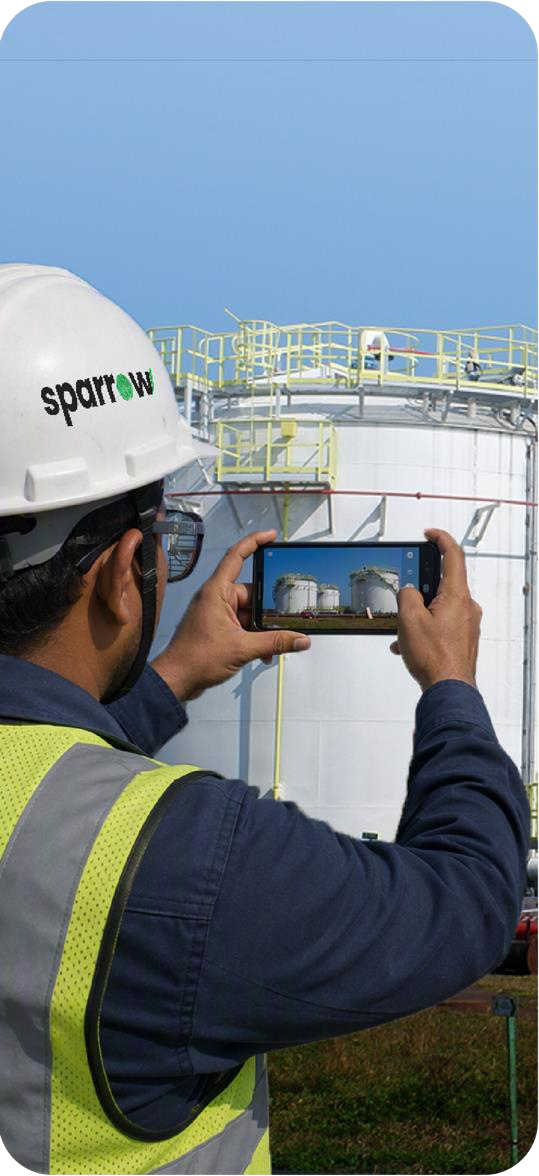
LIVE · DRISHTITANK FARM B
HANDRAIL · OPEN EDGE
TANK · NOT GAS-FREED
ON SITE · 10:42 · GEO-TAGGED
Initiator captures the work location
9:415G ▮▮▮
AI PTW™S
System UserAssign user
INITIATORSystem UserAssign user
ISSUERPermit images
min. 1 required
10:42 · TIME-STAMPED◉ GEO-TAGGED
Capture image
Upload files
DRISHTI · READING THE PHOTO
9:415G ▮▮▮
AI PTW™S
BasicWork at HeightLOTOTO
Your SOP checks · 6SOP-WAH-04 · answered6/6 ✓
+ AI added for this job2 OPEN
Added on top of your SOP. Please address below.
Is a lift plan in place, detailing the maximum load and lift dynamics?
OSHA 1926.753(d)
Type your response
Send
Have all workers involved been equipped with fall protection gear?
OSHA 1926.502(d)
Type your response
Send
9:415G ▮▮▮
AI PTW™S
Permit checklistPTW/1059
6YOUR SOP
+4AI ADDED
0REMOVED
YOUR SOP · SOP-WAH-04STATIC
✓Full-body harness with double lanyard
✓Area barricaded below the work zone
✓Hot work area cleared of combustibles
✓Fire extinguisher at the work point
+ 2 more SOP checks
AI ADDED · THIS JOBFROM PHOTO
✓Tank purged and gas-tested before weldingOISD-STD-105
✓Return lead clear of the live cable trayOSHA 1910.254
Send to issuer · 10 checks
4 HAZARDS · 5 CHECKS
YOUR SOP + AI · ONE PERMIT
01SEE THE SITE
02CAPTURE
03AI ADDS CHECKS
04SOP + AI PERMIT
JOB + PHOTO IN→ PEHCHAAN→ DRISHTI→ NIYAM→ KAVACH→ ISSUER DECIDES
01 · The problem
The permit was signed. The checklist was ticked. So, what did it miss?
2/3
of chemical-industry accidents happen during maintenance. Permit-to-work (PTW) failure is the largest single cause.
!NOT ON THE LIST
Tank not gas-freed. Live cable tray one metre from the arc.
02 · Digital work permit, on site
From the job to a permit. Standing right there.
Sign the scenario. Not just a generic form.
9:415G ▮▮▮
AI PTW™S
Site
Test Site▾
Shift
Shift A (06:00 – 14:00)▾
Area
Cooling tower area
Description of work
welding of lighting pole on top of dosing tank
✓Work at HeightLOTOTOScaffolding
AI PERMIT RECOMMENDATION
WORKING AT HEIGHTCONFIDENCE: HIGH
The work involves welding on top of a dosing tank, implying activities at an elevated level. This requires fall prevention or protection systems.
01 · DESCRIBE
Say the job
In your words. The right permit comes back, with its reason.
9:415G ▮▮▮
AI PTW™S
System UserAssign user
INITIATORSystem UserAssign user
ISSUERPermit images
min. 1 required
10:42 · TIME-STAMPED◉ GEO-TAGGED
Capture image
Upload files
DRISHTI · READING THE PHOTO
02 · CAPTURE
Photograph the site
One photo, stamped with the time and location.
9:415G ▮▮▮
AI PTW™S
BasicWork at HeightLOTOTO
Your SOP checks · 6SOP-WAH-04 · answered6/6 ✓
+ AI added for this job2 OPEN
Added on top of your SOP. Please address below.
Is a lift plan in place, detailing the maximum load and lift dynamics?
OSHA 1926.753(d)
Type your response
Send
Have all workers involved been equipped with fall protection gear?
OSHA 1926.502(d)
Type your response
Send
03 · ANSWER
Ensure additional checks
Your SOP checks stay. AI adds more from that photo, each with its clause.
03 · The questions
The questions no checklist knew to ask.
A job description and one photo of the work location. Every check that comes back is written for that job, carries its clause, and sits on top of your SOP checklist. Never in place of it.
91.8%
unique to the job that asked
94.5%
cite the clause behind them
PERMIT CHECKLIST · WAH6 SOP + 4 AI
YOUR SOP · SOP-WAH-04 · STATIC6 / 6 ANSWERED
✓ Harness, double lanyard✓ Barricade below✓ Combustibles cleared✓ Extinguisher at point✓ Rescue plan briefed✓ Gas test logged
+ ADDED BY AI FOR THIS JOB · 4 HAZARDS
01
Has the tank been drained, purged and gas-tested before welding?
OISD-STD-105 · NFPA 51B
02
Is the welding return lead routed clear of the live cable tray?
OSHA 1910.254
03
Is fall protection anchored to a certified point, not the handrail?
OSHA 1910.28 · IS 3521
04
Is a fire watch posted during welding and for 30 minutes after?
OSHA 1910.252
04 · How AI permit-to-work works
Four engines. One permit.
IDENTIFY
01
Pehchaan
Reads the job as it is typed, and names the right permit, with its reason.
SEE
02
Drishti
Reads the site photo for open edges, live cables and combustibles.
CITE
03
Niyam
Keeps your SOP questions, then adds ones for this job, each tied to IS, OISD, OSHA or NFPA.
PROTECT
04
Kavach
Gives every hazard a precaution, PPE and an owner.
JOB + PHOTOISSUER DECIDES
05 · Two layers, one permit
Your SOP stays. AI adds the rest.
As a digital work permit system, every permit carries your organisation's static checklist, exactly as your SOP defines it. AI PTW™ reads the job and the site, then adds the questions that this one needs.
Issuer reviewPTW/1059 · Welding of lighting pole on top of dosing tankWORKING AT HEIGHTHOT WORK
LAYER 1 · YOUR SOPSOP-WAH-04 v3.1 · LOCKED
✓Full-body harness with double lanyardYES
✓Area barricaded below the work zoneYES
✓Hot work area cleared of combustiblesYES
✓Fire extinguisher at the work pointYES
✓Rescue plan briefed to the crewYES
✓Gas test logged before startYES
LAYER 2 · AI FOR THIS JOB+4 · CITED
✓Has the tank been drained, purged and gas-tested before welding?OISD-STD-105 · NFPA 51BSOURCE · PHOTO
✓Is the welding return lead routed clear of the live cable tray?OSHA 1910.254SOURCE · PHOTO
✓Is fall protection anchored to a certified point, not the handrail?OSHA 1910.28 · IS 3521SOURCE · PHOTO
✓Is a fire watch posted during welding and for 30 minutes after?OSHA 1910.252SOURCE · JOB TEXT
10 CHECKS6 SOP+4 AI0 REMOVED
Send backApprove permit
Locked
Your SOP questions are carried into every permit as approved. AI cannot edit, skip or reorder them.
Versioned
Each permit records which SOP version it was issued against, for audit.
Additive
AI only adds checks for the job and the site. It never removes or rewrites one.
06 · Hot work · confined space · work at height
Three jobs. Three permits. Each checked.
JOB 01
Description of work
“welding of canopy on control panel near cooling tower”
 SITE PHOTO · DRISHTI
AI PERMIT RECOMMENDATION
GENERAL WORKCONFIDENCE: HIGH
The work involves welding near a cooling tower, a standard maintenance activity with no mention of height or confined space. Welding tasks of this kind require a GENERAL WORK PERMIT.
JOB 02
Description of work
“welding of clamp inside dosing tank”
 SITE PHOTO · DRISHTI
AI PERMIT RECOMMENDATION
CONFINED SPACECONFIDENCE: HIGH
Welding a clamp inside a dosing tank qualifies as entry into a confined space: limited entry and exit, and potentially hazardous conditions. A CONFINED SPACE ENTRY WORK PERMIT is required.
JOB 03
Description of work
“welding of lighting pole on top of dosing tank”
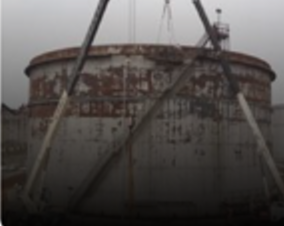 SITE PHOTO · DRISHTI
AI PERMIT RECOMMENDATION
WORKING AT HEIGHTCONFIDENCE: HIGH
Welding on top of a dosing tank implies work at an elevated level. This requires fall prevention or protection systems, fitting the WORKING AT HEIGHT permit classification.
07 · Six weeks · two plants · live permits
Site conditions caught before work began.
Each one written from a photo, and confirmed by the person standing there.
677
live permits raised
2,680
AI checks generated from site photos
100%
photographed before issue, 360 of 360
0
bypasses of a mandatory clause
14×
weekly volume growth, with no mandate
139
people using it across two plants
08 · EHS leadership · every plant
Permits become a map of risk.
Every permit is tied to its location. Repeat findings at one asset stop looking like unrelated jobs.
FROM THE PILOT
7/8
permits on one floor raised a confirmed exception. That points to the location, not the crew.
Dashboard
PTW
Safety Observation
BBSO
CAPA
Incident Reporting
HIRA
JSA Reporting
Contractor
PSSR
LOTO
MOC
Home / Permit list / DashboardAUTO-UPDATED 5M AGO
Permit to WorkAll SitesAll Departments
TOTAL RAISED
1,059+12%
EXTENDED
3ACTIVE
CLOSED
30929.1%
SUSPENDED
13ACTION REQ.
WITH JSA
00.0%
Status-wise distribution · 1,059 permits···
Draft351 · 33.1%
Execution207 · 19.5%
Closed309 · 29.2%
Issuer review42 · 4%
Custodian44 · 4.2%
Suspended13 · 1.2%
Extension review3 · 0.3%
Permits by department···
1
29
1
910
2
3
150
4
27
MechEHSInstEngQualityHR/SecProdElecMaterial
Permits by type···
884
41
118
General WorkConfined SpaceWorking at Height
Department-wise live permitsLIVE
2
178
2
1
11
EHSEngineeringHR/SecurityMaterialProduction
09 · Trust & governance
AI suggests. Your people decide.
01
Create
Initiator
02
Approve
Issuer chain
03
Prepare
Area owner
04
Execute
Performer
05
Close
Multi-level
06
Learn
EHS leaders
Human sign-off at every gate. Nothing is issued or closed on AI output alone.
Every generated check carries its clause. IS, OISD, OSHA, NFPA or your own standard.
Your checklist is the floor. AI adds to it. It never removes a thing.
10 · FAQ
AI permit to work, answered.
What is Sparrow AI PTW™?
+
Sparrow AI PTW™ is AI permit-to-work (PTW) software for industrial plants. The initiator describes the job and photographs the work location; AI PTW™ identifies the right permit, finds hazards in the photo and adds job-specific checks, each cited to a standard, before the issuer signs.
Does AI replace our SOP permit checklist?
+
No. Your organisation's SOP checklist is carried into every permit exactly as approved. AI cannot edit, skip or remove those static questions. It only adds extra checks for the specific job and site.
Which permit types does AI PTW™ support?
+
AI PTW™ supports common work permits including hot work, working at height, confined space entry, LOTOTO (isolation), scaffolding and general work permits, and can be configured to your own permit types.
Which safety standards are the AI checks cited to?
+
Each AI-generated check carries the clause behind it, from standards such as IS, OISD, OSHA and NFPA, or from your own internal standard.
Who approves the permit, the AI or our people?
+
Your people. AI suggests; humans decide. Nothing is issued or closed on AI output alone, and every gate in the permit lifecycle keeps a human sign-off.
How do we start?
+
With a pilot: one plant, one month. Week 1 to configure, weeks 2 to 4 running AI PTW™ in parallel with your current permits, and week 5 to read out the results.
Get in touch
One plant.
One month.
Run AI PTW™ beside the permits you issue today, and let the two sets of permits argue.
WEEK 1
Configure
WEEKS 2–4
Run in parallel
WEEK 5
Read out
600+
INDUSTRIAL CLIENTS
16
COUNTRIES
13+
YEARS